


Download Mulberry Mail – Secure Email, Calendar & Contacts Tool
Mulberry Mail is a full‑featured email client that bundles a calendar and contacts manager into a single, cross‑platform solution. Born from a developer’s curiosity about Internet mail protocols, the project quickly evolved into a robust application that supports POP3, IMAP, SMTP, and a wide range of calendar standards. Whether you are a power user who needs fine‑grained rule‑based filtering or a casual communicator looking for a reliable inbox, Mulberry delivers a consistent experience on Windows, macOS, and even legacy PPC systems.
Its “Simple” preference panel lets you get started in minutes by entering your name, email address, user ID, and mail server. From there you can explore advanced features such as server‑side spam filtering, auto‑replies, and custom folder hierarchies. The interface may feel a bit dated compared with modern, glossy clients, but the underlying engine is fast, secure, and highly configurable.
For anyone who values control over their email workflow and doesn’t mind a short learning curve, Mulberry Mail offers a compelling mix of power and stability without a subscription fee.
Core Features, Strengths & Weaknesses
Feature Highlights
- Support for POP3, IMAP, and SMTP protocols with SSL/TLS encryption.
- Integrated calendar that syncs with iCalendar, CalDAV, and Microsoft Exchange.
- Advanced message filtering, server‑side spam detection, and customizable rules.
- Rich text composer with HTML, plain‑text, and markdown options.
- Attachment preview pane that separates file names, sizes, and download links.
- Search‑as‑you‑type indexing for instant retrieval of messages across folders.
- Multiple account handling with unified inbox or per‑account views.
- Auto‑reply and vacation responder settings with scheduling support.
- Extensive scripting API for automation and third‑party plug‑ins.
- Comprehensive user guide and online knowledge base.
Pros
- Highly configurable rules engine gives power users total control.
- Cross‑platform support ensures a consistent experience on Windows and macOS.
- Secure connection options (SSL/TLS) protect credentials and message content.
- Calendar integration eliminates the need for a separate scheduling app.
- Lightweight design consumes minimal system resources compared with bloated competitors.
Cons
- Interface looks dated; lacks modern flat‑design aesthetics.
- Steep learning curve for users unfamiliar with POP3/IMAP concepts.
- No native mobile apps for iOS or Android; relies on desktop environments.
- Occasional compatibility quirks with the newest Exchange server versions.
- Limited built‑in chat or collaboration tools that many contemporary suites provide.
Installation, Usage & Compatibility
Step‑by‑Step Installation
1. Download the installer from the official Mulberry website. Choose the Windows (.exe) or macOS (.dmg) package based on your operating system.
2.
Run the installer and follow the on‑screen wizard. The process takes under five minutes and does not require admin privileges on most systems.
3. Launch Mulberry Mail after installation.
The first‑time startup wizard opens automatically.
In the wizard, select the “Simple” setup mode. Enter the following details:
- Real name – how you want recipients to see you.
- Email address – your full address (e.g., [email protected]).
- User ID – often the same as the email prefix.
- Mail server – the incoming (POP3/IMAP) and outgoing (SMTP) server addresses.
Basic Usage Tips
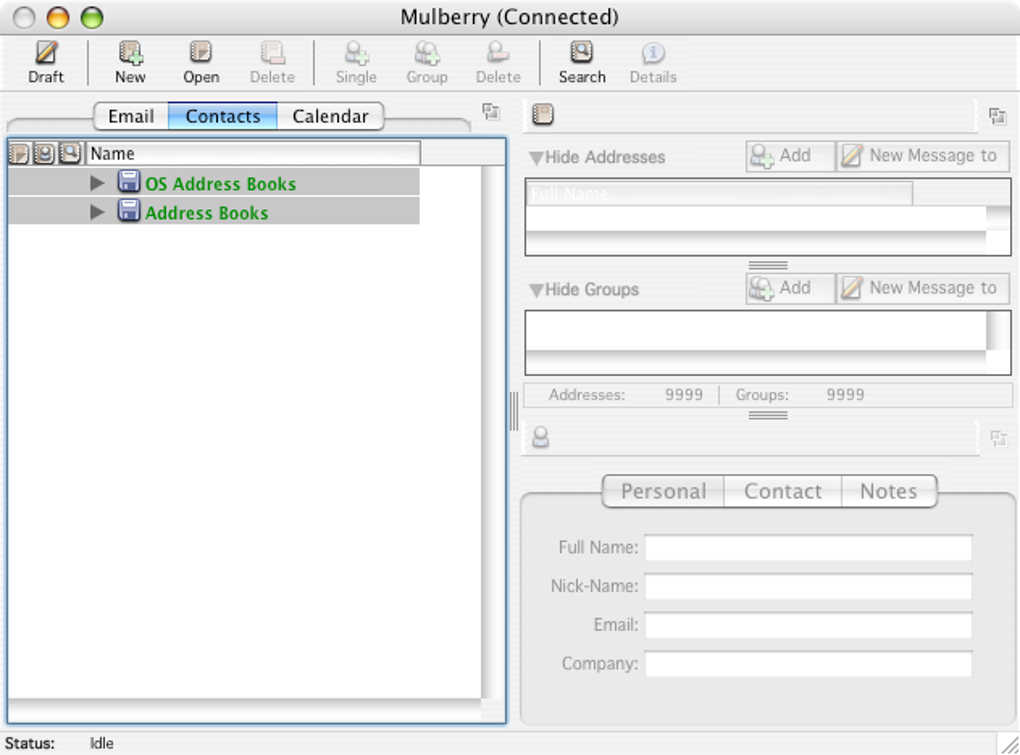
Once you’re inside the main window, you’ll notice three distinct panes: the address caption, an attachment table, and the message body. Use the left navigation tree to switch between mail folders and calendar views. To create a new rule, go to Preferences > Rules, define conditions (e.g., sender, subject keywords), and choose actions (move to folder, mark as read, delete). The built‑in spam filter can be toggled from the same menu, and you can train it by marking messages as “Spam” or “Not Spam.”
Compatibility and System Requirements
Mulberry Mail runs natively on the following platforms:
- Windows 10, 11 (64‑bit) – requires .NET Framework 4.7 or later.
- macOS 10.13 (High Sierra) and newer – includes a universal binary for both Intel and Apple Silicon chips.
- Legacy PPC & x86 Mac OS X – supported via the bundled Universal version for older hardware.
Minimum hardware: 2 GB RAM, 200 MB free disk space, and a broadband internet connection for seamless synchronization. The client is fully compatible with major email providers (Gmail, Outlook.com, Yahoo) as long as the appropriate IMAP/SMTP settings are supplied.
Frequently Asked Questions
Can Mulberry Mail handle multiple email accounts simultaneously?
Yes. Mulberry allows you to add unlimited accounts, each with its own set of rules, signatures, and folder structures. You can view all inboxes in a unified list or keep them separate for better organization.Is there a free version or trial period?
Mulberry Mail is offered as a free download with full functionality. There are no time‑limited trials or hidden fees, making it an attractive choice for budget‑conscious users.How does Mulberry protect my data during transmission?
The client supports SSL and TLS encryption for both incoming (POP3/IMAP) and outgoing (SMTP) connections. You can enforce the highest security level in the account settings.Can I sync my calendar with mobile devices?
While Mulberry itself does not have native mobile apps, its calendar data can be exported as iCalendar files or synchronized via CalDAV, allowing you to view events on any iOS or Android calendar app that supports those standards.What should I do if I encounter a daylight‑saving‑time issue?
The latest release includes a mandatory update for US and North America daylight‑saving‑time changes. Simply download and install the update from the Mulberry website; the calendar will automatically adjust future events.Conclusion & Call to Action
Mulberry Mail stands out as a mature, secure, and feature‑rich email client that brings calendar and contact management under one roof. Its strong points—robust protocol support, powerful rule engine, and low system footprint—make it a solid choice for professionals and power users who prioritize control over flashiness. The dated UI and lack of dedicated mobile apps are valid drawbacks, but they do not outweigh the productivity gains for most desktop‑centric workflows.
If you are ready to replace a fragmented set of tools with a single, dependable application, download Mulberry Mail today. The free installer provides immediate access to all core features, and regular updates keep security and compatibility up to date. Take advantage of the built‑in calendar to manage meetings, and let the advanced filtering keep your inbox tidy. Experience a classic yet capable email environment that still respects modern security standards.
Pros
- Extensive protocol support and encryption.
- Integrated calendar with CalDAV compatibility.
- Highly customizable rule engine.
- Lightweight and fast on older hardware.
Cons
- Interface feels dated.
- No native mobile client.
- Learning curve for beginners.







